

'Cause Everybunny Matters!
Collecting Without Cash
Fewer people carry coins than they used to, so a tin on its own now misses a good number of people who would happily give. A sealed tin, a tap-on-phone app, or both side by side will keep a collection working, and there are a few things to have in place before you start.
Three Ways To Collect
Most supporters use more than one. A tin catches the loose change, and a phone catches everyone who no longer carries any.

A Sealed Collection Tin
We can lend you a sealed, numbered tin for a shop counter, a staff room or an event table. We record which tin is with whom, and we help you count and pay in what you collect. An easy, passive way to collect donations.
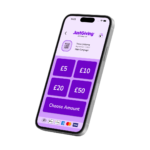
Toucan JustGiving
A tap-on-phone app that connects directly to our JustGiving account, so donations reach the charity without passing through anyone else’s bank account. There is no hardware to buy and nothing to pay up front.
GiveStar
A free fundraising app with a Tap to Donate feature that turns your own phone into a card reader using its built-in contactless chip. It works with debit and credit cards and with Apple Pay, Google Pay and Samsung Pay.
Before You Collect
Some of what follows is a legal requirement and some of it is our own guidance. Each point says which it is.
Collecting in a Public Place Needs Permission
Public charitable collections in Scotland are regulated under the Civic Government (Scotland) Act 1982. If you want to collect in a street, a park, a shopping centre’s public areas or anywhere else the public has free access to, you must apply to the relevant local authority for permission first. Councils normally ask for several weeks’ notice, and they set their own application deadlines.
Collecting door to door requires a separate licence. Please do not do this on our behalf without speaking to us first.
Collecting on private premises, which covers a shop counter, an office, a church hall or a private event, does not need a council permit. It does need the permission of whoever runs the premises. That one is our own guidance rather than a legal requirement, but we would ask you to extend the courtesy every time.
Money Must Come To The Charity Directly
This is a legal and accounting requirement. Whichever method you use, the account it pays into must be the charity’s. Please do not collect donations into a personal bank account and forward them on afterwards, because that breaks the audit trail we are required to maintain and it removes the donor’s protection.
Both of the apps we recommend are set up so that funds reach Beloved Rabbits directly. If you are unsure whether yours is configured correctly, send us a screenshot before your first collection and we will check it with you.
Tell People Who You Are Collecting For
This is a legal requirement. Anyone donating should be able to see the charity’s name and Scottish charity number, SC049128. We can provide a printed card, a QR code and a lanyard badge for this. Ask us and we will get them to you before your collection date.
Will My Phone Do This?
Both apps need a phone with a contactless chip. That is the same part of the phone you use to pay in a shop by holding your handset against the card reader, and it is what lets your phone read someone else’s card in return.
The short test is this. If you can already pay for your shopping with Apple Pay, Google Pay or Samsung Pay, your phone has what is needed. Most handsets sold in the last five or six years do. If you have never used your phone to pay for anything, the app will tell you when you install it whether your handset is supported.
You do not need a card machine, a card reader or any other equipment. The phone in your pocket is the whole of it.
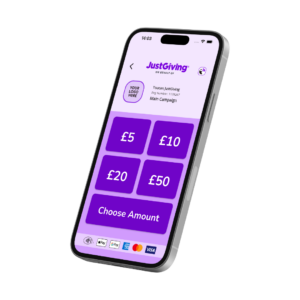
Toucan is a JustGiving partner, so the app links to the same charity account our online donations already use.
This means we get some preferencial pricing offers, we can often receive 100% of your donations, and Gift Aid is processed by JustGiving on our behalf.
Step 1
Install The App
Download Toucan JustGiving free from the App Store or Google Play. Look for the app called Toucan JustGiving rather than any of Toucan’s other apps.
Step 2
Register
Create a fundraiser account inside the app. This is your own account and it takes a couple of minutes.
Step 3
Search for Us
Use the search in the app to find Beloved Rabbits and select us as the campaign you are collecting for. That is what links every donation you take to the charity.
Step 4
Start Collecting
Supporters tap a card or their own phone against yours. Gift Aid is captured in the app, and the donation arrives in our JustGiving account.
The donation amounts are already set. The figures a donor sees on screen are the ones we have set for the campaign, so there is nothing for you to configure. A donor is always able to choose their own donation value.
Setting Up GiveStar
GiveStar suits individual fundraisers well, because Tap to Donate sits alongside the fundraising page you are already sharing with friends and family.
Step 1
Install The App
Download GiveStar free from the App Store or Google Play, then sign up or log in.
Step 2
Choose Your Page
You can either create your own fundraising page and select Beloved Rabbits as the charity, or search for an existing Beloved Rabbits campaign and raise against that. Either route works.
Step 3
Select Tap-To-Donate
Choose Tap to Donate from the menu bar, pick the page you are raising for, and enter the amount the donor wants to give.
Step 4
Start Collecting
Hold your phone out and the donor taps their card against it. On an iPhone the reader is at the top front of the handset, and on Android phones it is usually on the back.
Turn on location services for the app. GiveStar requires location access for Tap to Donate to work at all, so if donations will not go through, that setting is the first thing to check.
Getting a QR Code
A printed QR code sits well beside a tin or a phone. Some people would rather scan and give in their own time than tap in front of a queue.
Print it larger than you think you need to! A code the size of a beer mat scans reliably from a table or a counter. Anything smaller tends to fail in poor light, and a donor rarely tries twice.
Our General Donation Code
If you are collecting for the charity rather than for a challenge of your own, use ours. It points at the Beloved Rabbits JustGiving page and needs no setting up.
Your Own Page's Code
Every JustGiving fundraising page has its own QR code, and where you find it depends on the address of your page. If your page address begins justgiving.com/page/, log in, open your page, click Edit your page, open the Share tab and select the QR symbol at the end of the row of sharing icons. If it begins justgiving.com/fundraising/, add /qrcode/ to the end of the address in your browser and the code appears on screen.
If Something Goes Wrong
The apps belong to Toucan and GiveStar, and they hold the account and payment records we cannot see. For anything technical, they will get you a proper answer far faster than we can.
Toucan JustGiving Support
Go to Toucan for anything about installing the app, registering your account, a payment that will not complete, or a donation that has not appeared.
GiveStar Support
GiveStar’s help centre covers device compatibility, Tap to Donate problems, and how and when funds reach the charity. There is a live chat inside the app as well.
Ask Us Instead About
Collection tins, printed materials and lanyards, what to say about where the money goes, whether an event idea fits our fundraising policy, and anything at all about the rabbits.
What Works In Practice
These come from supporters who have done it, and they make a noticeable difference to what a collection raises.
- Name an amount when you ask. People give more readily when someone suggests a figure than when they are left to decide it themselves in front of a queue.
- Have one clear sentence ready about what the money does. “Seven pounds is a fortnight of hay for a rescued rabbit” lands better than a general appeal.
- Take a printed QR code as well, which you can get from the section above. Some people would rather scan and give in their own time than tap in front of a queue.
- Charge your phone before you go, and take a power bank. Contactless collection drains a battery quickly.
- Bring a tin alongside the phone. Older supporters in particular still want to give in coins and notes, and a collection with no cash option leaves money on the table.
- Take photographs while you are collecting, with people’s permission, and send them to us. We would like to thank you properly afterwards.
Fundraising The Kind Way
Our ethical fundraising policy does not permit gambling techniques, so the challenge uses no raffles, tombolas, prize draws or sweepstakes. Every activity we suggest raises money through effort, generosity or the sale of goods, and never through a bet.
Tell Us What You Are Planning
You can install either app and start today. Tell us what you are planning anyway, because we can send you a tin, printed materials and a lanyard that identify you as collecting on our behalf, and we like to know who is out there so we can thank you properly.